IntakeQ

by IntakeQ  · Based in Canada → — Easiest HIPAA Compliant form builder
Family Medicine Internal Medicine Psychiatry

Starting at $29.90/month

Overview

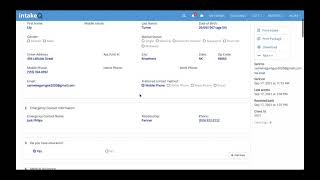
IntakeQ provides a comprehensive, cloud-based solution designed to streamline administrative tasks and enhance the patient experience for healthcare professionals. It offers secure, HIPAA-compliant online intake forms, consent forms, and questionnaires, simplifying data collection and reducing paperwork. With its intuitive drag-and-drop builder, practices can create customizable, branded forms with conditional logic to capture precise patient information and medical histories. The platform supports electronic signatures, automated form reminders via text or email, and secure document sharing. Beyond forms, IntakeQ includes features for progress notes (SOAP), staff accounts, and a secure client portal for seamless communication. It aims to optimize workflows, improve record-keeping efficiency, and help practitioners focus more on quality patient care.

Reviewed by Pouyan Golshani, MD — Interventional Radiologist

Key Features

  • Customizable Online Forms
  • Electronic Signatures
  • Automated Form Reminders
  • HIPAA Compliant Forms
  • Secure Document Sharing
  • Progress Notes (SOAP)
  • Staff Accounts
  • No-code Form Builder
  • Conditional Logic
  • Secure Client Portal

Use Cases

  • New patient registration and intake
  • Medical health history collection
  • Questionnaires and surveys
  • Treatment notes and charting
  • Appointment management and reminders
  • Secure client communication

What Physicians Need to Know

EHR Auto-Population
IntakeQ integrates with various EHRs (e.g., Elation EHR, RevolutionEHR) to automatically upload completed patient intake forms as PDFs to the patient chart. For new patients, it can create a profile with basic demographics, and for existing patients, it can populate missing demographic, contact, and insurance information. It also pulls patient information from forms into charting notes digitally, reducing manual entry.
Note Template Customization
The platform offers extensive customization for online forms and progress note templates (e.g., SOAP notes). Users can create, edit, and personalize templates with flexible question formats, conditional logic, diagrams, and attachments. Existing paper forms can also be converted.
Specialty-Specific Models
IntakeQ is utilized across diverse specialties, including counseling, physical therapy, primary care, psychiatry, and psychology. While it doesn't explicitly offer 'AI models' tailored to specific specialties, its highly customizable forms and note templates allow practitioners to adapt the system to their unique specialty requirements and workflows.
Dictation Accuracy Rate
IntakeQ includes a voice recognition feature for dictating progress notes. However, specific dictation accuracy rates (e.g., Word Error Rate) for this feature are not publicly disclosed in the provided information.
Real-Time vs Post-Visit Processing
IntakeQ primarily focuses on pre-visit processing, allowing patients to complete intake forms electronically before appointments. For practitioner notes, the voice recognition feature can be used in real-time during note-taking, and completed forms are immediately available for review.
Multi-Speaker Recognition
IntakeQ's voice recognition feature is designed for single-speaker dictation of notes. There is no indication of multi-speaker recognition capabilities for distinguishing between different speakers in a conversation.
Note Turnaround Time
By enabling electronic patient intake and providing customizable note templates with voice recognition, IntakeQ aims to significantly streamline documentation and reduce administrative time for practitioners, improving overall efficiency. Completed intake forms are instantly available upon submission.
Chart Review Features
IntakeQ provides a client profile/timeline where practitioners can view a consolidated history of intakes, progress notes, and appointments. It also offers 'Questionnaire Analytics' for insights from aggregated form data and features for reviewing and graphing client scores for measured assessments.
Physician Tip

Leverage IntakeQ to automate your patient onboarding by sending customizable, HIPAA-compliant forms digitally before appointments, significantly reducing in-office paperwork. Utilize the highly flexible progress note templates and voice recognition to streamline your documentation process, allowing more focus on patient interaction. Regularly review the client timeline for a comprehensive patient history and use questionnaire analytics to gain valuable insights into your practice and client data. Ensure seamless data flow by integrating with your existing EHR and payment systems.

IntakeQ offers robust integration capabilities to enhance practice workflows. It integrates with major EHR systems like AthenaHealth, Elation EHR, and RevolutionEHR for automated document uploading and demographic data population. Payment processing is supported through integrations with Stripe and Square. For scheduling and telehealth, it connects with Google Calendar and Zoom. Additionally, IntakeQ provides an API for custom integrations and can be connected with thousands of other apps via Zapier's webhooks and custom actions, allowing for extensive workflow automation.

Details

Category Documentation & Scribing, Patient Intake & Forms
Pricing Starting at $29.90/month
  • Forms Only (low volume): $29.90/month (10 submissions/month); Forms Only: $54.90/month (unlimited forms, 2 assistant accounts); Practice Management (low volume): $54.90/month (25 appointments/25 submissions/month); Practice Management: $84.90/month (all Forms Only features + appointment management, client portal, payments, telehealth); Additional practitioner costs: Forms Only $20/month, Practice Management $30/month, Forms Only (low volume) $10/month, Practice Management (low volume) $25/month
DeploymentCloud-based
Compliance
BAA AvailableUnknown AI-estimated
HIPAA CompliantUnknown AI-estimated
FDA Status Unknown AI-estimated
Integrations
EHR Not specified
Specialties Family Medicine, Internal Medicine, Psychiatry

What the Web Says

IntakeQ is a web-based online intake form management software designed for healthcare professionals to streamline patient onboarding, documentation, and communication. It is praised for its user-friendly interface, extensive customization options for forms and workflows, and features like appointment scheduling, payment processing, and secure messaging. The platform aims to reduce paperwork and administrative tasks, improving efficiency for practices of various sizes, particularly small to medium-sized ones. While generally well-received, some users note a learning curve and occasional issues with EHR integration and customer support responsiveness.

Overall: Positive

Strengths

  • User-friendly interface and ease of use for both staff and patients.
  • Extensive customization options for forms, workflows, and branding.
  • Streamlines patient intake, documentation, and scheduling, reducing administrative burden.
  • HIPAA compliant and offers secure handling of patient data.
  • Includes features like appointment reminders, online scheduling, payment processing, and telehealth.
  • Good customer support, with many users reporting timely and helpful assistance.

Limitations

  • Limited full integration with some Electronic Health Record (EHR) systems, requiring manual workarounds.
  • Occasional navigation difficulties and a learning curve for new users due to extensive features.
  • Some users have reported issues with printing documents and demographic information disappearing.
  • Templates and color schemes can be unappealing and lack customization options for some users.
  • Pricing can be a hurdle for practices as they scale, with SMS messages often billed separately.
  • Some users have experienced issues with customer support responsiveness or receiving only links to guides.

Based on reviews from: G2, Capterra, SelectHub, Emitrr, Software Finder, SoftwareWorld, ITQlick, Reddit, TopAdvisor, Wisevu, Software Advice

Last updated: 2026-07-24

Ratings & Reviews

No reviews yet. Be the first to review this tool!

Rate IntakeQ

Clinical Value
Ease of Use
Integration
Support & Docs
Value for Money

Press & Coverage

Business Wire
IntakeQ Debuts Medical E-Prescribing Within its PracticeQ Platform for U.S. Healthcare Professionals
IntakeQ launched electronic medical prescribing (e-prescribing) within its PracticeQ platform for U.S. clinicians, integrating directly with ScriptSure Cloud ERX on the Surescripts platform. This new feature aims to save providers time, reduce e-prescribing penalties, and improve patient costs and experience.
2023-06
PracticeTek
IntakeQ Joins the American Nutrition Association Nutrition Leaders Council
IntakeQ has partnered with the American Nutrition Association (ANA) as a member of its Nutrition Leaders Council, aiming to advance nutrition education and practices and integrate nutrition into the core of the nation's healthcare system.
2023-05
Monir Tech Solutions
Best Patient Intake Software for MA Practices 2026
IntakeQ is highlighted as a dedicated clinical specialist for optimizing the clinical intake pipeline, providing a secure patient portal for comprehensive medical history, insurance card uploads, and electronic signatures. It is built for medical environments and integrates smoothly with major ambulatory EHR platforms.
2026-06
ACCESS Newswire
The Official Top 20 Healthcare Technology Companies of 2025
IntakeQ is recognized among the top healthcare technology companies for simplifying the patient intake process with customizable online forms, e-signatures, and workflow automation, which reduces paperwork and improves efficiency.
2025-05
B2B News Network
Best Patient Intake Form Software For Healthcare (2026)
IntakeQ is recommended as the best patient intake form software for smaller practices, focusing on intake and forms with a straightforward setup and practice-friendly features for quick adoption.
2026-07
RxPhoto
8 HIPAA-Friendly Patient Intake Form Options for Med Spas and Aesthetic Practices in 2026
IntakeQ is presented as a HIPAA-compliant practice management platform with a strong foundation in digital intake, enabling practitioners to send forms via text or email and offering features like scheduling, payments, telehealth, and billing.
2026-05
IntakeQ Blog
Year-End HIPAA Compliance Checklist: Securing Your Digital Intake Process
IntakeQ emphasizes its role in simplifying HIPAA compliance with a secure, end-to-end intake solution that prioritizes patient privacy and helps practices control patient data securely from the start.
2024-11
Taylor & Francis Online (Journal: Art Therapy)
Exploring the Integration of Technology in Art Therapy: Insights From Interviews With Art Therapists
This peer-reviewed article mentions IntakeQ as a Practice Management Software (PMS) that streamlines form-filling, billing, and enables telehealth for therapists, ensuring HIPAA compliance during remote sessions.
2024-09

Videos

Product demos, reviews, and walkthroughs for IntakeQ.

View all on YouTube

Frequently Asked Questions

IntakeQ primarily focuses on streamlining administrative tasks through digital forms and practice management features. While IntakeQ itself doesn't extensively feature built-in generative AI for clinical notes or deep patient data analysis, it can integrate with AI-powered tools like Kickcall for an AI voice receptionist that handles calls, schedules appointments, and provides real-time call summaries. Some alternatives, however, are noted for offering AI-powered intake that automatically populates clinical documentation, reducing manual data entry.
Yes, IntakeQ is designed to be fully HIPAA compliant, providing a Business Associate Agreement (BAA) to its users. The platform employs robust security measures, including encryption of data both in transit and at rest, secure logins with strong password requirements, two-factor authentication, firewalls, and intrusion detection systems to safeguard patient data.
While IntakeQ excels in digital intake forms and basic practice management, it may have limitations for physicians seeking deeply integrated, AI-driven EMR functionalities. Some sources suggest that clinicians might still need separate tools for comprehensive EMR and billing, as IntakeQ's native capabilities in these areas might be considered basic compared to more modern, all-in-one platforms. Its AI features are more focused on administrative automation rather than advanced clinical documentation generation from intake data.
Several alternatives to IntakeQ offer more comprehensive practice management and advanced AI features. SPRY, for instance, is highlighted as an AI-powered solution with integrated intake, EMR, billing, and analytics, capable of generating documentation from intake data. Other notable alternatives include SimplePractice, athenahealth, Tebra (Kareo + PatientPop), DrChrono, and AdvancedMD, many of which provide robust EMR integration and broader practice management tools.
IntakeQ offers tiered subscription plans, including a 'Forms Only' plan starting around $49.90-$54.90 per month and a 'Practice Management' plan around $79.90-$84.90 per month, with lower-volume options also available. Hidden costs can arise from additional practitioner fees, which vary by plan, and potential overage fees for SMS usage if limits are exceeded. Standard plans typically include 300 form submissions per practitioner per month, with automatic upgrades if low-volume limits are consistently surpassed.
IntakeQ's core offering focuses on digitizing and managing patient intake forms, scheduling, and basic practice management, which are primarily administrative functions. While it helps organize patient data and offers progress note templates (like SOAP notes), it does not appear to natively use AI for generating complex clinical documentation or extracting deep, actionable clinical insights from intake data beyond basic analytics. Its AI integrations, such as with Kickcall, are geared towards automating communication and appointment tasks.
In addition to being HIPAA compliant, IntakeQ also adheres to other significant data privacy regulations. The platform states its compliance with GDPR (General Data Protection Regulation) for the European Union and PIPEDA (Personal Information Protection and Electronic Documents Act) for Canada. This ensures a broad scope of data protection for practices serving patients under these different regulatory frameworks.

Related Tools

Menaela
Menaela
Documentation & Scribing
Menaela is an AI-first practice management system that combines the functions of an AI secretary with a comprehensive practice management system. It handles patient communications, scheduling, lead follow-up, and prepares draft medical notes, aiming to reduce administrative burden for solo practitioners and small clinics.
Cortex
Cortex
Clinical Decision Support & Reference
Cortex Workspace is a secure, HIPAA-compliant AI platform designed to streamline healthcare workflows and enhance decision-making for physicians.
Mandolin
Mandolin
Documentation & Scribing
Mandolin is an AI-powered platform designed to streamline clinical documentation for physicians, reducing administrative burden and improving efficiency.
SureMediks ProView
SureMediks (Rasimo Systems, LLC)
Clinical Decision Support & Reference
SureMediks is an AI-powered clinical decision support and metabolic health platform that automates care workflows for specialists, providing AI-generated patient summaries, automated chart review, and real-time biometric alerts.
SigXA
SigXA
Documentation & Scribing
SigXA is an AI medical scribe and ambient assistant that transforms patient encounters into structured clinical documentation, specifically tuned for endocrinology teams to manage hormonal and metabolic conditions with protocol-driven longitudinal monitoring.
MedCare MSO AI RCM Solutions
MedCare MSO
Documentation & Scribing
MedCare MSO provides AI-powered Revenue Cycle Management solutions including medical billing, coding, and rule engines to optimize financial processes for healthcare practices.

See all Documentation & Scribing tools →

Suggest an Edit → | Last Verified: 2026-04-21 | First Added: 2026-04-21
AI Tool Finder
AI-powered search. Results may not be comprehensive.